
Contact information

Majdal Anjar, Bekaa, Lebanon

Available 24/7. Call Us +961 81 456 701 info@leenkat.com
Follow us
Leenkat New Tab

Turn Every New Tab Into Your Personal Workspace

Organize your websites, create multiple workspaces, save notes and AI prompts, personalize your background, and access what matters faster — every time you open a new tab.

Free • Available on the Chrome Web Store

About the Project

Your Browser, Organized Around You

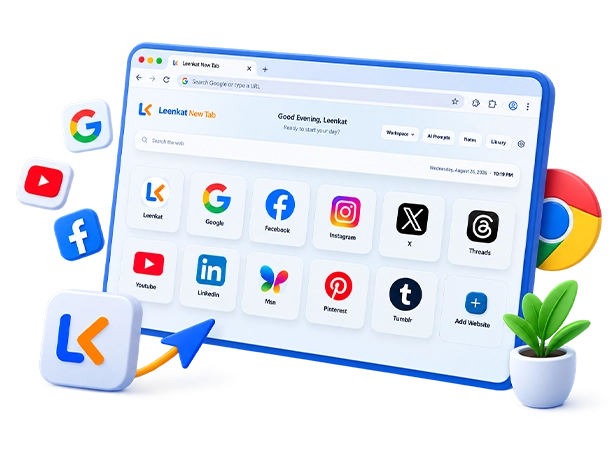
Leenkat New Tab is a productivity-focused Chrome extension developed by Leenkat to turn the standard browser new tab into a more useful and organized digital workspace.

Instead of starting with an empty page, users can access their frequently used websites, search the web, organize their workspace, and use productivity tools from one clean and intuitive interface.

The product is designed around simplicity, flexibility, and everyday usability. Features are carefully integrated to provide more functionality without making the new tab feel crowded or complicated.

Leenkat handles the complete development of the product, from product planning and user experience design to development, testing, optimization, and continuous improvement.

Key Features

Everything You Need in One New Tab

Leenkat New Tab brings everyday browsing and productivity tools together in one streamlined workspace.

Multiple Workspaces

Separate websites into focused spaces for work, personal use, projects, or anything else.

Website Library

Keep your websites organized in one central library and add them to the workspaces you need.

Notes

Keep quick notes, ideas, reminders, and information close to your browsing workflow.

AI Prompts

Save, organize, customize, and reuse your most useful AI prompts.

Recently Visited

Quickly return to recently visited websites without leaving your new tab.

Personalization

Customize key parts of the experience to create a new tab that better fits the way you work and browse.

Productivity

A Workspace That Starts With Every New Tab

A new tab is one of the most frequently opened pages in a browser. Leenkat New Tab turns that everyday action into an opportunity to stay organized and reach important tools faster.

Frequently used websites and productivity features remain easily accessible, reducing unnecessary navigation and helping users maintain a cleaner browsing workflow.

The interface is intentionally designed to stay simple and familiar, allowing users to benefit from additional functionality without changing the natural way they use their browser.

User Experience

Simple by Design

Every part of Leenkat New Tab is designed with usability in mind. Clear navigation, consistent components, intuitive controls, and a carefully structured interface make the extension easy to understand from the first use.

As new capabilities are introduced, the experience remains focused on keeping essential actions accessible while preventing unnecessary complexity.

Development

Designed, Developed & Evolved by Leenkat

Leenkat New Tab is an in-house product designed and developed by Leenkat from the ground up.

Leenkat manages the complete product lifecycle, from design and development to testing, optimization, release, and continuous improvement.

The extension continues to evolve through carefully planned updates focused on new capabilities, reliability, usability, and a consistent user experience.

Product

Leenkat New Tab

Product Type

Chrome Extension

Developer

Leenkat

Platform

Google Chrome

Category

Productivity

Status

Active & Maintained

First Release

2026

Availability

Chrome Web Store

Backup & Restore

Take Your Workspace With You

Back up your Leenkat New Tab settings and data whenever you need, and restore your workspace quickly on another installation or after reinstalling the extension.

Your websites, workspaces, notes, AI prompts, and supported preferences can be preserved in a portable backup file.

Resources

Everything You Need to Get Started

Explore product documentation, updates, privacy information, and support resources for Leenkat New Tab.

User Guide

Learn how to set up, customize, and use Leenkat New Tab.

Changelog

Follow new features, improvements, fixes, and product updates.

Privacy Policy

Learn how Leenkat New Tab approaches privacy and user data.

Report a Problem

Found an issue? Send us the details so we can investigate and improve the product.

Leenkat New Tab

Make Every New Tab More Useful

Turn your browser’s new tab into an organized workspace built for faster access, better organization, and everyday productivity.

Let’s Build Something Great Together

Have a Project in Mind?

Start a Project
  • bubble-12
  • bubble-16